How to Recover Gmail Password Easily – Step-by-Step Guide (2026)
How to Recover Gmail Password Easily – Step-by-Step Guide (2026): Gmail is one of the most widely used email services in the world.

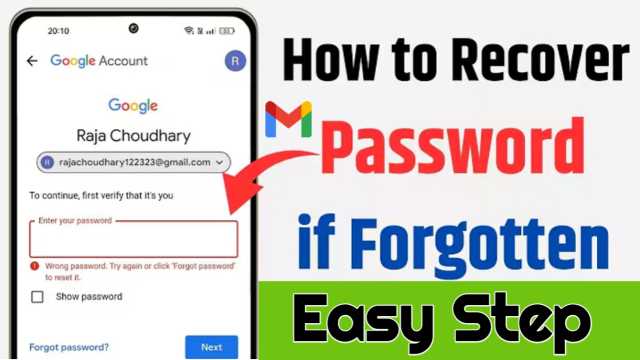
How to Recover Gmail Password Easily – Step-by-Step Guide (2026): Gmail is one of the most widely used email services in the world. Millions of people use Gmail for personal communication, business, social media accounts, banking, and many other important services. Because of this, forgetting your Gmail password can be stressful and frustrating. However, the good news is that Gmail provides a simple and secure recovery system that helps you recover your password easily.


In this guide, you will learn the complete step-by-step process to recover your Gmail password in 2026 using safe and official methods. This article is written in simple human-friendly language so anyone can follow it without confusion.
Why People Forget Their Gmail Password
There are many common reasons why people forget their Gmail password. Some users create complex passwords for security and forget them later. Others may not log in for a long time and forget their login details. Sometimes, accounts can also be locked due to suspicious activity.
Another common reason is changing the password and forgetting the new one. Whatever the reason, Gmail provides multiple ways to recover your account safely.
Step 1: Go to the Gmail Login Page
The first step is to open the Gmail login page. You can do this by going to the official Gmail website.
Enter your Gmail email address and click on the “Next” button. On the password screen, click on the “Forgot Password?” option.
This option will start the Gmail account recovery process.
Step 2: Enter Your Last Remembered Password
Gmail will ask you to enter the last password you remember. If you remember your previous password, enter it and click “Next.”
If you do not remember any password, click on “Try another way.”
This step helps Gmail verify that you are the real owner of the account.
Step 3: Verify Using Your Phone Number
If your phone number is linked to your Gmail account, Gmail will send a verification code to your number.
Enter the code you received and click “Next.”
This is one of the fastest and easiest ways to recover your Gmail password.
Phone verification helps Gmail confirm your identity quickly.
Step 4: Verify Using Recovery Email
If you do not have access to your phone number, Gmail may send a verification code to your recovery email address.
Open your recovery email, find the code, and enter it in the Gmail recovery page.
This method also helps you recover your password safely.
Recovery email is very useful if your phone number is not available.
Step 5: Answer Security Questions
Sometimes Gmail may ask you security questions. These questions help verify your identity.
Answer the questions correctly and continue the process.
If your answers match Gmail records, you will be allowed to reset your password.
Step 6: Create a New Password
Once your identity is verified, Gmail will allow you to create a new password.
Choose a strong password that is easy for you to remember but difficult for others to guess.
Use a combination of letters, numbers, and symbols for better security.
After creating the new password, click “Save.”
Your Gmail account will now be recovered successfully.
Tips to Create a Strong Password
A strong password protects your Gmail account from hackers and unauthorized access.
Use at least 8 to 12 characters. Include uppercase letters, lowercase letters, numbers, and special symbols.
Avoid using simple passwords like your name, date of birth, or mobile number.
Do not share your password with anyone.
A strong password keeps your account safe and secure.
What to Do If You Cannot Recover Your Account
If you do not have access to your phone number or recovery email, you can still try account recovery.
Click on “Try another way” and follow the instructions.
Gmail may ask you to verify using your device, location, or previous login information.
Make sure you use a device and internet connection that you used before with your Gmail account.
This increases your chances of successful recovery.
Properties of Gmail Password Recovery System
Gmail password recovery has several important properties that make it safe and reliable.
First, it uses multiple verification methods such as phone number, recovery email, and security questions.
Second, it protects your account from unauthorized access.
Third, the recovery system is fast and easy to use.
Fourth, it is completely free and available to all Gmail users.
Fifth, it ensures your personal data remains secure.
These properties make Gmail recovery safe and trustworthy.
Glamour and Importance of Gmail Account Access
Having access to your Gmail account is very important in today’s digital world. Gmail is connected to many services like YouTube, Google Drive, Play Store, and social media accounts.
Your Gmail account stores important emails, documents, and personal information.
Recovering your Gmail password helps you regain access to all these services.
A secure Gmail account also improves your digital identity and professional presence.
It allows you to communicate safely and manage your online activities.
How to Avoid Losing Your Gmail Password Again
To avoid losing your password in the future, always save your password in a secure place.
You can use a password manager to store your passwords safely.
Make sure your phone number and recovery email are updated.
Enable two-step verification for extra security.
These steps help protect your Gmail account and make recovery easier.
Conclusion
Recovering your Gmail password in 2026 is simple if you follow the correct steps. Gmail provides multiple recovery options such as phone verification, recovery email, and identity verification.
The process is safe, secure, and designed to protect your account.
Always create a strong password and keep your recovery information updated. This ensures that you can recover your account easily if you forget your password again.
Gmail password recovery helps you regain access to your important emails, files, and online services. By following this step-by-step guide, you can recover your Gmail password quickly and safely without any difficulty.
